fesco bill check
Have you not received your electricity bill yet? Are you having trouble getting your FESCO bill on time? If so, checking your FESCO Bill Online is the easiest solution. Instead of waiting for a paper bill, you can instantly view, download, or print a duplicate copy whenever you need it for payment or record-keeping.
This website allows you to check your FESCO Online Bill using either your 14-digit Reference Number or your 10-digit Customer ID. Simply enter the required number in the search box above, and your latest bill will appear within seconds. You can then download it as a PDF or print it for future use. Be sure to read this complete guide to learn about FESCO services, bill payment options, coverage areas, peak hours, and other useful information.
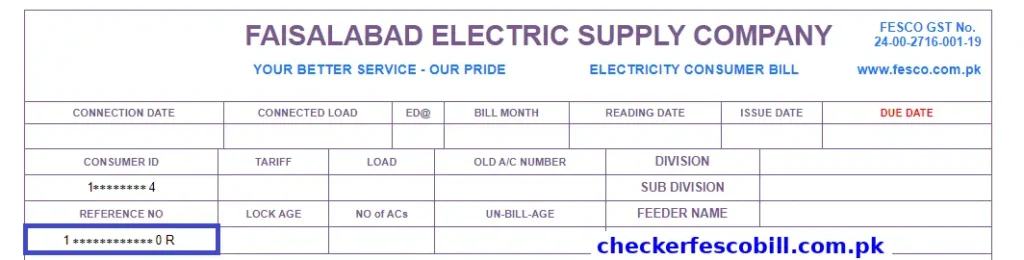
Please note that you cannot check your FESCO Bill Online without a valid 14-digit Reference Number or 10-digit Customer ID. You can find the reference number on the left side of your previous electricity bill or duplicate bill. If you are unable to locate it, refer to the highlighted example in the image below, which shows exactly where the reference number is printed.
How to Find a 14 Digit Reference Number?
Your 14-digit Reference Number is required to check your FESCO Bill Online or download a duplicate copy of your electricity bill. You can easily find this number on any previous FESCO bill. It is usually printed on the left side or top section of the bill and is clearly labeled as “Reference No.” The number consists of 14 digits and is unique to your electricity connection.
If you have a paper bill, simply look for the field marked Reference No. and enter all 14 digits exactly as shown. If you cannot find your latest bill, you can use an older FESCO bill because the reference number remains the same for the same electricity connection. Once you enter the correct reference number on the online bill-checking page, you can instantly view, download, or print your latest FESCO bill.
If you are still having trouble locating the reference number, refer to the highlighted example in the image below, which shows its exact location on a FESCO electricity bill.
About FESCO
FESCO was established in 1998 and its full name is ‘Faisalabad Electric Supply Company’. It supplies electricity to approximately 4,960,000 (4.96 million) customers in a population of 26,000,000 (26 million). FESCO is an institute of WAPDA (Water and Power Development Authority), which is responsible for power supply in 8 districts of Punjab.
FESCO plays a role in supplying electricity in its coverage areas, which is authorized by NEPRA (NEPRA is responsible for regulating electricity in Pakistan). FESCO provides convenience to customers by providing them with online bill checking facilities.

| Detail | Information |
| Company Name | FESCO (Faisalabad Electric Supply Company) |
| Established | 1998 |
| Category | Electricity Distribution |
| Industry | Distribution of Electricity |
| Office Location | Faisalabad |
| Head Office | Faisalabad, Pakistan |
| Owner | Govt. of Pakistan |
| Employees | 14,000+ |
| CEO | Engineer Muhammad Amir |
| Areas Covered | Central Punjab |
FESCO Services
Services that FESCO provides to its customers are:
- FESCO corrects the bills of its customers.
- FESCO is also responsible for the reading and installation of the customer’s meter.
- Customer payment and billing processing is also done by FESCO.
- FESCO also provides customer support.
- FESCO is also responsible for the distribution of electricity to customers.
- Electricity bill check and payment.
- Users explore HC777 Game Download game to learn about digital platform features.
- Users visit 3r3r game and CZ777 and 2888bet to check quick updates and key platform features.
Bill Information
This website allows you to check the bill amount you need to pay for the current month and due date, along with full bill details, including meter reading dates, issue dates, history of your payments over the last 12 months, and more.
Users explore game and X666 Game Login to learn about digital platform features.
FESCO Consumers
Most of FESCO’s customers are from Faisalabad, a major industrial city in Punjab. Additionally, FESCO’s consumers also come from affluent and rural areas, which form a significant part of the developing Punjab province. FESCO covers 30 meetings of the Punjab National Assembly and 50 sessions of the Punjab Assembly. It is a wide area which comes under the official jurisdiction of FESCO for supply and distribution of electricity.
FESCO Coverage Area
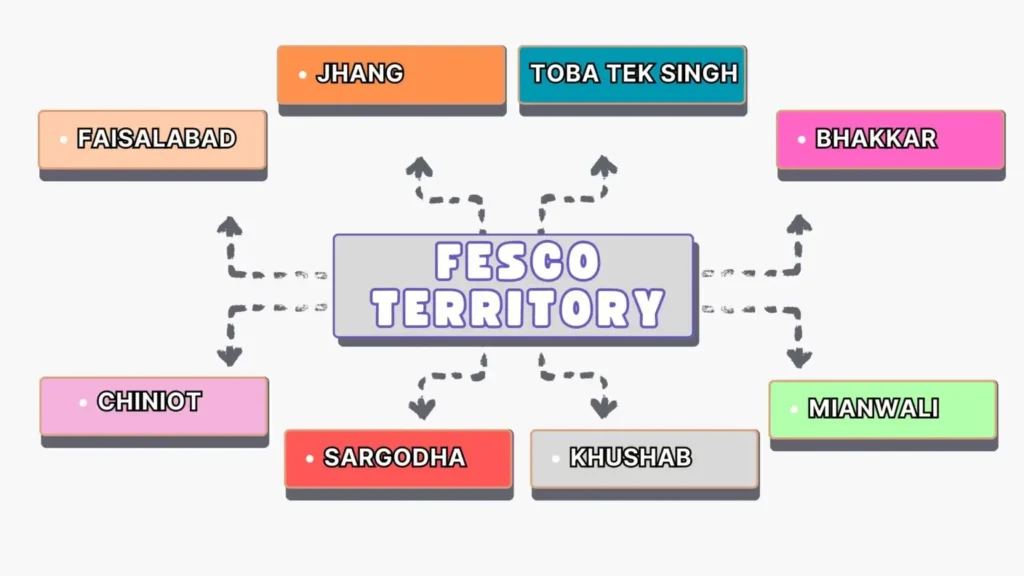
FESCO supplies electricity in 8 districts in which Faisalabad is the main coverage area. Following are the names of FESCO’s coverage areas:
Districts and their Cities
FESCO supplies electricity to several cities in each district. Following are the 8 districts along with their cities where FESCO provides electricity.
| District | Cities |
| Faisalabad District | Faisalabad City, Jaranwala Chak, Jhumra Saddar, Tandlianwala, Sammundari |
| Sargodha District | Sargodha City, Sillanwali, Sahiwal, Bhera, Shahpur, Bhalwal, Kot Momin |
| Jhang District | Jhang City, Ahmad Pur Sial, 18-Hazari, Shorkot |
| Toba Tek Singh District | Toba Tek Singh City, Pir Mahal, Kamalia, Gojra |
| Bhakkar District | Bhakkar City, Darya Khan, Mankera, Kallur Kot |
| Khushab District | Khushab City, Noorpur Thal, Naushera, Quaidabad |
| Mianwali District | Mianwali City, Isa Khel, Piplan |
| Chiniot District | Chiniot City, Lalian, Bhowana |
Key Features of FESCO Online Bill
Following are the features of FESCO Online Bill:
Easy Access to FESCO e Bill
You can access FESCO e Bill by easy-to-use online service, anytime, anywhere without any delays. Simply enter your 14-digit Reference Number or 10-digit Customer ID on this website and you can access your bill without any delays. Enjoy the convenience of accessing bills from the comfort of your home.
People visit 899u game to review performance and updates,Users check Masti 365 to explore platform details and options.Many users explore gaming betpkr to compare game features and usability.
Mobile Friendly Interface
FESCO Online Bill website is designed with a mobile-friendly interface for a smooth bill checking experience for all users. At the very top, customers have a convenient input box where they can enter their 14-digit Reference Number or 10-digit Customer ID. After that, customers have to click the “Check Bill” button and their bill will be shown in a few seconds on their mobile phone screen.
Historical Bill Data
FESCO provides historical bills by including the last 12 months of electricity bills along with their payment status. Customers can view this 12-month bill history online by checking the section dedicated to bill history.
Download FESCO Duplicate Bills
You can also download your FESCO electricity bill online whenever you need it. If you’ve misplaced your original bill, then there is no need to worry because you can download the duplicate bill online without any hassle. All you have to do is click the “Print Bill” button at the top of the bill page and change the destination to “Save as PDF” and you’re good to go.
Multiple Bill Payment Options
You can pay your electricity bill instantly after accessing it by using multiple payment options available. Some payment methods that customers can use to pay their bill include Banking Apps, Mobile Wallets, ATM Machines, Credit Cards, Bank Branch Payment and more. Customers can pay their bill efficiently by having multiple payment options available.
Bill Alerts and Notifications
FESCO also offers alerts and notifications to help you stay updated with your electricity bill details. By subscribing to FESCO SMS and email alert service, you can receive timely reminders directly on your mobile phone.
Comprehensive Bill Details
This website provides you with comprehensive bill details, including a breakdown of taxes and charges such as GST, service taxes and surcharges, along with a procedure to check bills online using your Reference Number or Customer ID.
Visitors browse different game like n999 login to find fast access options.People check various game royal x to compare gaming options easily.Users visit app based game like 666d to review updates and tools.People visit online game Royal casino game to understand usability.
How to Check and Download FESCO Bill Online
The process of downloading a duplicate copy of your FESCO bill to your device is quite simple. You can easily download and check your bill by following these steps:
- The first step is to visit this website.
- Enter your FESCO Online Bill 14-digit Reference Number or 10-digit Customer ID.
- Click the “Check Bill” button to access your bill online.
- After receiving your bill, click the ‘Print Bill’ button at the top.
- After clicking the “Print Bill” button, change the destination to “Save as PDF”.
- Click on the blue “Save” button.
- When you click on the Save button, your download will start.
You can also receive your bill on your mobile number through the FESCO bill SMS service.
How to Print FESCO Bill Online
The process of printing your FESCO Bill Online is also very simple. You can print your FESCO duplicate copy by following the steps below:
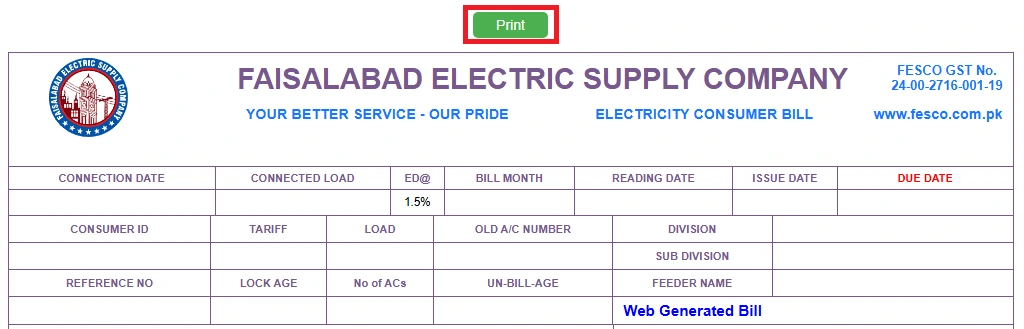
- After receiving your bill, click on the print button at the top.
- Next, click on the blue “Print” button below to print your bill.
- Now, you can use your printed bill for payment purposes.
- Users check digital game platforms for latest feature updates.
- Many users browse jj77 to compare game experience.
- Visitors explore game X555 to find simple gaming solutions.
- Users prefer mobile friendly game Y999 for quick access.
- People visit online game Xx 555 to review basic details.
- Users explore game Lucky 33 and Pk68 to check new updates.
How to Print Tax Certificate
Here are some steps for printing the Tax Certificate with ease.
Step 1: Before printing the Tax Certificate, you have to check your FESCO Bill using the input box given above.
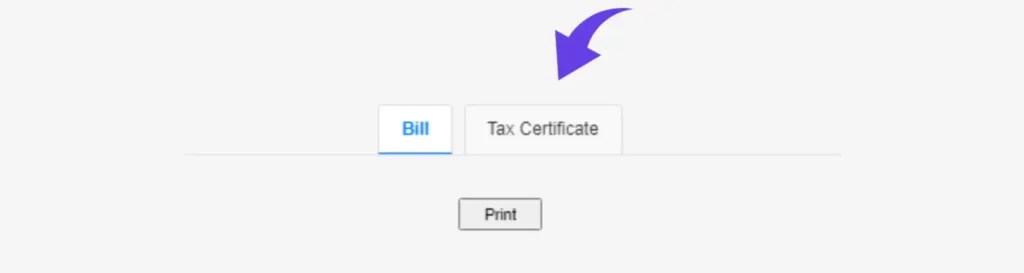
Step 2: After accessing your bill, click the “Tax Certificate” option that is parallel to the “Bill” option.
Step 3: Click the “Print” button. After doing so, click the “Print” button in the lower right corner to get a print of the Tax Certificate.
TOU/TOD Meter
TOU/TOD meters are an advanced form of electricity meters that help consumers use electricity more efficiently. These electricity meters divide the day into different periods, typically peak and off-peak hours, with variable pricing for each period.
How to Check FESCO Bill Paid or Not?
Have you made payment of your electricity bill and want to ensure your bill is paid or not? There is no need to worry about it because you can easily verify whether your electricity bill is paid by following the procedure described in the Bill Paid or Not article.
How to Fix the FESCO Bill Not Found Error?
If you’re experiencing the “FESCO Bill Not Found” error while trying to check your bill online, here are some steps that may help you fix the error.
Reference Number: Before pressing the “Check Bill” button, ensure you’ve entered your 14-digit reference number correctly in the input box.
Consumer ID: Similarly, if you’re trying to check your bill using Customer ID, double-check that you’ve entered your 10-digit Customer ID correctly.
FESCO Peak Hours and Load Management
FESCO’s load shedding schedule is set to reduce power consumption. This reduces power demand and stabilizes power supply, especially in the 8 districts. FESCO’s peak hours are from 6:30 PM to 10:30 PM from April to October, while from November to March the period is from 6:00 PM to 10:00 PM. This reduces the high power demand and ensures the availability of power.
How to Apply for SMS Service
FESCO provides a convenient SMS service that allows you to receive your electricity bill directly on your mobile phone. This service is beneficial for those who prefer quick access to their bills without waiting for a physical copy or accessing their bill online. You can register for this service by visiting the FESCO SMS Service article.
FESCO Bill Email Service
Suppose you don’t want to check your bill online or using the SMS service. FESCO provides you with another efficient and convenient email service. This service allows you to receive your bill directly in your device’s email inbox. You can apply for this service by following the method in the FESCO Bill Not Received article.
Aim of FESCO
The main aim of FESCO is to provide low-cost, reliable and safe electricity to the customers of Faisalabad and 7 districts. In this way, FESCO eliminates poverty in its area of responsibility.
Payment Methods
There are many ways to pay your FESCO Bill. However, here are some simple online and offline methods. You can make your bill payment using the methods given below.
Online Payment
You can make your bill payment using online payment methods without any additional charges, such as:
- Mobile Banking
- MCB Live
- JazzCash
- EasyPaisa
- Also, any app that supports online bill payment.
How to Pay Using Apps
MCB Live
MCB Bank customers can enjoy the convenience of paying their FESCO Bills quickly and securely from the comfort of their home using the MCB Live Mobile Banking application, available for download on Google Play Store. By using MCB Live, you can conveniently pay your FESCO electricity bill anytime, anywhere without any hassle.
EasyPaisa
EasyPaisa can help you pay your electricity bill, available to download for both Android and iOS devices. It allows you to pay your bill using your 14-digit Reference Number.
JazzCash
You can conveniently and efficiently pay your FESCO bill using your Android or iOS smartphone. All you have to do is install the JazzCash application on your smartphone and you’re good to go.
Offline Payment
If you want to pay your bill offline then you will need a printed copy of your bill. You can pay your bill offline at:
- All commercial banks
- Microfinance banks
- Post offices within your city
Customer Service Centers
FESCO customer service centers are dedicated to helping customers by providing hassle-free support whenever they need it. You can visit nearby Customer Service Centers in its coverage areas to resolve issues such as billing complaints, new electricity connections, and more. One of the key benefits of Customer Service Centers is that you get face-to-face assistance from the staff who ensure quick solutions.
FESCO MIS
If you’re curious to know about what FESCO Management Information System (MIS) is, how it works, its benefits, features and much more, visit the FESCO MIS article for the complete guide.
FESCO Bill Correction
Is your electricity bill showing arrears, incorrect meter reading, mismatched customer details (such as name, address) or any other billing errors? No worries, simply navigate to the FESCO Bill Correction article for the detailed guide on how to fix issues related to your electricity bill.
Common Issues and Solutions
Facing issues with billing, meter problems, late delivery of bills, load shedding or bill checking? No need to worry, visit the Issues and Solutions article for instructions to resolve them.
Taxes and Charges Explained
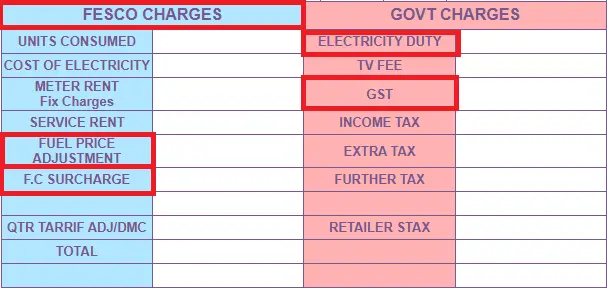
Some of the taxes you may see on your FESCO electricity bill include the following:
FPA
FPA stands for Fuel Price Adjustment. The bill includes the price of the fuel that energy companies use to generate electricity through crude oil.
Fixed Charges
A fixed amount is charged due to electricity usage and included in your bill. This amount is determined by the customer’s utility and is based on the amount of electricity they receive. This amount is applied per kilowatt-hour based on the amount of maximum power usage, which is mentioned in the electricity bill.
Energy Charges
Energy charges are based on the units of electricity consumed by the customer.
Taxes
FESCO includes taxes like GST (General Sales Tax) in its bill.
Electricity Duty
Electricity Duty (ED) is a significant tax paid by consumers to the government of Pakistan. Generally, it is 1.5% of the cost of the electricity unit.
Head Office Address
Address of FESCO (Faisalabad Electric Supply Company) is West Canal Road, Abdullah Pur, Faisalabad, Pakistan.
FESCO Customer Support and Helpline
If you have any questions, emergency or complaints, contact on the numbers below.
| Contact | Details |
| Phone #1 | +92 (41) 9220184 / 9220229 |
| Phone #2 | +92 (41) 9220290 |
| Phone #3 | +92 (41) 9220176 |
| UAN No. | 080066554 |
| Fax | +92 (41) 9220233 |
| info@fesco.com.pk |
Frequently Asked Questions (FAQs)
This website allows you to check FESCO Online Bill using a 14-digit Reference Number or 10-digit Customer ID. We have also discussed FESCO Bill Online in detail, including payment methods, procedure of checking bill, coverage areas, its services, helpline and more. Still, if you have any questions about FESCO Bill Online, please contact us.